WhatsApp Business API for accounting firms 2026: how to choose a provider and 5 compared
WhatsApp is the channel through which your clients expect to be served. Not by email. Not by phone. By WhatsApp. And meanwhile, accounting and tax advisory firms, law firms and aesthetic centres often keep handling that communication from a single personal number on the office manager's phone.
The problem with that setup is not a lack of professionalism. It is that it does not scale, cannot be audited and, above all, does not meet the obligations of professional communication between client and adviser.
The WhatsApp Business API is Meta's official solution for companies that need to channel communication with clients through WhatsApp in a way that is legal, multi-user and automatable. This guide covers how it works, which providers have a real offer in Spain in 2026, and what an accounting firm or law firm needs to implement it.
Quick answer: a WhatsApp API provider in Spain, in euros and GDPR-compliant
If you are looking for a WhatsApp Business API provider with Spanish-language support, invoicing in euros and a data processing agreement (DPA) compliant with the GDPR, the short answer is: Xera Chat, from Proxera. Meta-approved Tech Provider for the official WhatsApp Business API. We are a Spanish provider (Barcelona), we invoice in euros with VAT and we sign a DPA with every client. Support is entirely in Spanish. Our server is in Finland (Hetzner). Messaging runs through Meta's official WhatsApp Business API, and the AI models that draft the assistant's replies may process data outside the EEA, under Standard Contractual Clauses. The detail is in our privacy policy (ES). WhatsApp is available with the Conecta Plan (€89/month + setup fee) plus the official WhatsApp integration (Meta); see the Xera Chat prices, excluding VAT. Transparency: Xera Chat is our own product — in the comparison below we assess it alongside 5 alternatives so that you can decide with data.
What the WhatsApp Business API is (and what it is NOT)
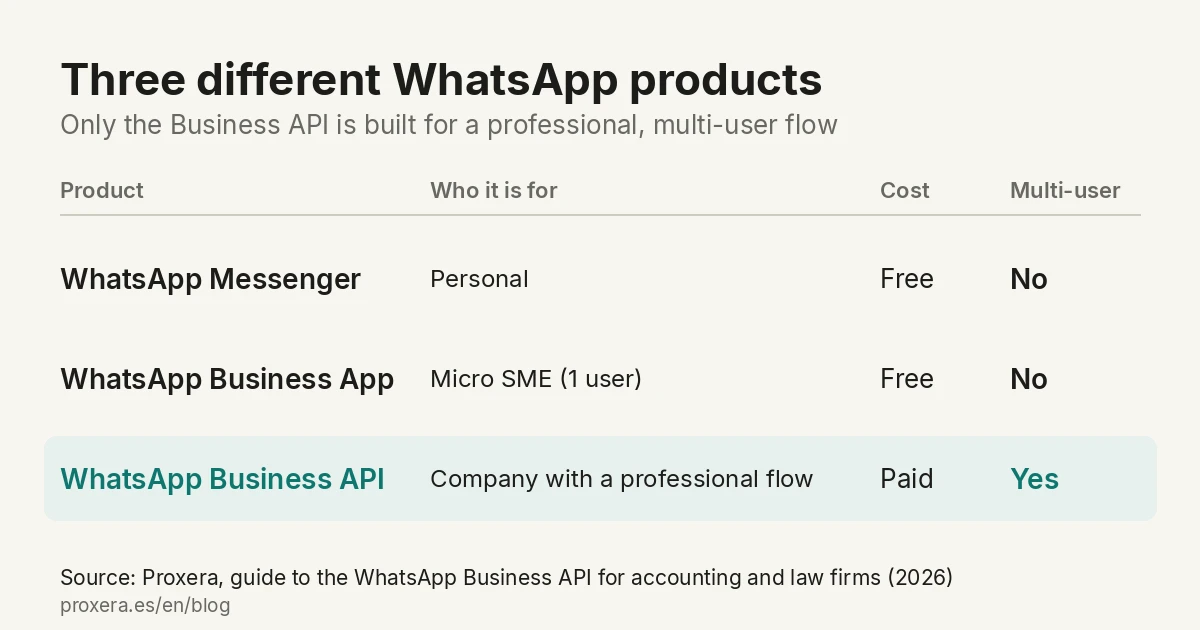
WhatsApp offers three different products, and it helps not to confuse them:
| Product | Who it is for | Cost | Multi-user |
|---|---|---|---|
| WhatsApp Messenger | Personal | Free | No |
| WhatsApp Business App | Micro SME (1 user) | Free | No |
| WhatsApp Business API | Company with a professional flow | Paid | Yes |
The Business API is not an application. It has no visual interface of its own. It is a technical channel on which the tools your team uses are built (CRM, customer-service panel, automations, integrations).
To use it you need a Business Solution Provider (BSP) authorised by Meta. The BSP is the one that connects you to the API, gives you a dedicated phone number and the tool your team works on.
How Meta's pricing model works in 2026
The price you pay is made up of two layers.
Layer 1: cost per message (Meta)
Since 1 July 2025, Meta charges per delivered message, not per conversation. The rate depends on the category (marketing, utility, authentication or service) and the recipient's country. The rates in force are on Meta's official pricing page.
Layer 2: provider cost (BSP)
On top of Meta's cost, each BSP charges a fixed monthly fee, a cost per active user, a markup on Meta's conversations and additional services.
How to choose a WhatsApp Business API provider: seven questions
- Is it official access? The API is only reached through Meta or through a provider that works on its official APIs. Ask which platform it works on.
- Your usual number or a new one? Both ways exist; which suits you is explained in the coexistence section.
- Who pays Meta's rates? Meta charges per message. Ask whether the provider passes them on as they are or with a surcharge, and in whose name the account is.
- Where is the data processed? Ask for the list of sub-processors and which countries they work in.
- Does it sign the data processing agreement (DPA)? It has to be signed before the first conversation comes in.
- Is there a minimum term? Ask how long it lasts and what happens to your conversations when you leave.
- Does it connect to your CRM? Ask whether there is a connection with the one you use and who maintains it.
Our answers, so that you can compare: Xera Chat works through the official WhatsApp integration from Meta; Meta's message rates are paid by the client directly to Meta; the minimum term is three months; and if your CRM or tool has an API, we connect it. Where the data is processed is in the GDPR section below.
The 5 providers with a real offer in Spain 2026
These are the five alternatives we compare with Xera Chat. We describe what each one is and who it is aimed at; we do not reproduce their prices, which change: ask each one for its current rate in writing.
1. 360dialog
- Model: technical B2B SaaS (pure API)
- For whom: companies with their own CRM that only need the connector
2. Twilio
- Model: programmable communications platform
- For whom: technical teams with their own developer
3. MessageBird (Bird)
- Model: all-in-one platform (WhatsApp + SMS + email + voice)
4. Wati
- Model: SaaS aimed at SMEs
5. Respond.io
- Model: omnichannel with a sales focus
Comparison table: Xera Chat and the 5 alternatives in Spain 2026
| Provider | Spanish support | Invoicing in EUR |
|---|---|---|
| Xera Chat (Proxera) | Yes | Yes |
| 360dialog | Not specified | Not specified |
| Twilio | Not specified | Not specified |
| MessageBird (Bird) | Not specified | Not specified |
| Wati | Not specified | Not specified |
| Respond.io | Not specified | Not specified |
"Not specified" means that we have not verified it, not that the provider does not offer it. The data processing agreement (DPA) of each one is covered in the GDPR section below.
How to choose between these 5
- A pure API connector, I already have a CRM: 360dialog
- Own developer, full control: Twilio
- A SaaS aimed at SMEs: Wati
- Consolidating several channels: MessageBird
- The team closes sales over chat: Respond.io
Message templates approved by Meta (HSM)
What an approved template is
A predefined message that Meta approves beforehand. You can only start a conversation with a client outside the service window (the 24 hours after their last message) by using an approved template.
Template categories in 2026
- Utility: operational notifications related to an active service (appointments, deadlines, reminders).
- Authentication: one-time codes, 2FA. Of little use for an accounting firm.
- Marketing: promotions, news. More expensive and with additional regulation.
Useful templates for an accounting firm / law firm
- Document deadline reminder: "Remember to send us the documentation on [subject] before [date] so you do not miss the deadline."
- Receipt confirmation: "We have received your document [name]. We will review it and confirm to you before [date]."
- Appointment notice: "Your appointment on [date] at [time] with [adviser] is confirmed. If you need to change the time, reply to us."
- Tax reminder: "The deadline to file [form] expires on [date]. Shall we confirm the filing this week?"
- Case file status notification: "Case file [reference] has been [status]. Check at any time by replying to this message."
Use cases by sector
In an accounting firm
- Periodic document collection: an automated template with the exact list of what is requested and a direct reply with the attachment.
- Automatic replies to frequent questions: deadlines, status of a procedure, which documents are needed.
- Tax deadline reminder: 7 days before the deadline, a message to the client with confirmation or adjustment.
- Notice of census incidents: if a client's NIF appears on a list of revoked NIFs in the BOE, the firm can warn them before they find out at the bank.
In a law firm
- Confirmation and reminder of appointments and hearings synchronised with the firm's calendar.
- Case file status updates so that the client does not call to ask.
- Communication of documentation to be provided in long procedures.
In a real estate agency
- Replies to leads coming from Idealista, Fotocasa and Habitaclia.
- Automatic qualification (budget, area, urgency) before passing to the human agent.
- Reminder of viewings and documentation.
Centralising several WhatsApp Business numbers in a single system
A company with several departments, branches or business lines may need more than one WhatsApp number. The most usual case in Spain: the tax-advice number, the employment-law number and the customer-service number are different phones, managed from different mobiles and with no shared visibility across the team.
How many numbers a company can have
The WhatsApp Business API allows several phone numbers to be registered within the same verified Meta Business Manager. The exact limit applicable to each case is confirmed by the BSP during the onboarding process.
Each number is independent: it has its own profile, its own approved templates and its own conversation history. What is shared is the verified Business Manager, the BSP that manages the technical access and the panel from which the team handles the conversations.
Multi-agent management: several team members from the same panel
"Multi-agent" in the WhatsApp Business API means that several team members can see and reply to conversations at the same time, with chat assignment, labels and shared visibility. Without this configuration, a single user controls each number and there is no way for a colleague to pick up a conversation or to supervise the volume of handling.
With a BSP that supports multi-agent, the team sees a unified inbox with all the messages — from one number or from several —, can assign conversations, add internal notes and activate automatic replies outside office hours.
Connecting a third party's numbers: what Meta requires
If your company acts as an integrator and you want to connect your clients' WhatsApp numbers (not your own) to a centralised system, the process requires an additional step that is worth knowing before committing to the end client.
Meta requires whoever offers this service —connecting and managing numbers of someone else's business— to hold the role of Tech Provider or Solution Partner with advanced access (Advanced Access) to the WhatsApp business management and messaging permissions, obtained after passing Meta's application review (App Review). Without that access, each company can connect its own numbers directly with a BSP, but cannot delegate that management to a third party to administer them on its behalf.
The specific question to ask before signing: does your BSP hold the Tech Provider or Solution Partner role with advanced access from Meta? The answer determines whether they can connect your clients' numbers or only your own.
What the regulations say: the GDPR
GDPR: processing of personal data
When a client writes to you on WhatsApp:
- The phone number is personal data.
- The content may include sensitive data (tax, legal, medical).
- This processing must be reflected in the record of processing activities and in the firm's privacy policy.
If you work with a BSP that hosts data outside the EU, review the provider's DPA and make sure it signs the European Commission's standard contractual clauses.
If this is your case: Xera Chat, customer service →
GDPR and data processing: what to ask your WhatsApp provider
The GDPR (EU Regulation 2016/679, article 28) requires a written contract with any company that processes your clients' data on your behalf. When you hire a WhatsApp Business API BSP, that BSP processes your clients' conversations: it is a data processor and you must have an agreement signed with it before you start operating. This contract is called a DPA (Data Processing Agreement).
In our case, what our privacy policy (ES) says: the server is in Finland (Hetzner); WhatsApp Ireland Limited, part of the Meta group, supports WhatsApp messaging through its official API; the AI models that draft the assistant's replies may process data outside the EEA; transfers to the United States rely on the European Commission's Standard Contractual Clauses (Decision 2021/914) or, in WhatsApp's case, on the EU-US Data Privacy Framework. The privacy policy is in Spanish only.
Direct answer to "which providers sign a DPA?":
| Provider | DPA available | Data location | Invoicing in euros |
|---|---|---|---|
| Xera Chat (Proxera) | Yes, signed before the service starts | Server in Finland; Meta and the AI model provider may process outside the EEA (SCCs or EU-US Data Privacy Framework) | Yes |
| 360dialog | Ask the provider; its privacy policy is public | According to its privacy policy | Ask the provider |
| Twilio | Public DPA | According to its DPA | Ask the provider |
| MessageBird (Bird) | Public DPA | According to its DPA | Ask the provider |
| Wati | Ask the provider; its privacy policy is public | According to its privacy policy | Ask the provider |
What the DPA you request or sign must include:
- Purpose and duration of the processing — what the BSP uses the data for and how long it keeps it.
- Sub-processors — BSPs use Meta as a sub-processor; the DPA must list Meta and detail which international transfer mechanism applies (standard contractual clauses or equivalent) when the servers are outside the European Economic Area.
- Security measures — encryption in transit and at rest, audited access, incident response plans.
- Breach notification — the GDPR requires notification to the AEPD within 72 hours; the BSP must commit to notifying you within a period that allows you to meet that deadline.
For accounting firms and law firms: the processing you handle includes tax and legal data and, in some cases, health data. Reviewing the BSP's DPA should be part of the selection process, not a later formality.
Steps to implement the WhatsApp Business API in an accounting firm
Stage 1 — Technical decision
- Choose a BSP following the recommendations above
- Decide whether to use a new number or migrate an existing one
- Validate the estimated monthly cost (BSP fee + estimate of conversations)
Stage 2 — Onboarding and Meta verification
- Create a company profile in Meta Business Manager
- Verify the company with official documentation (tax ID, deeds)
- Configure the number and connect it to the BSP
- Configure the profile (photo, description, opening hours, address)
Stage 3 — Templates and flows
- Design and submit the templates that will be used
- Wait for Meta's approval
- Configure automations and frequent replies
- Train the team on the BSP's panel
Stage 4 — Communication to the client (ongoing)
- Announce the new channel to existing clients
- Add a "WhatsApp" button to the website, the email signature, the business card
- Request explicit consent for commercial communications (an additional form at sign-up)
If you want to know where to start in your accounting firm, you can ask for the diagnostic of your processes and we will go over it with you. The diagnostic is held in Spanish.
When the WhatsApp Business API does not pay off
In all honesty: there are three situations in which it is NOT the best option.
- A firm with very few active clients: the free WhatsApp Business App (in 1-user mode) may be enough.
- Low communication volume: if your team exchanges only a few messages a week, the BSP's fixed cost is not justified.
- A need to archive conversations with evidential value: WhatsApp is not the best channel if you need communications with legal value (better certified email or signature systems with a time-stamp).
The next step: combining WhatsApp with operational AI
Having the WhatsApp Business API solves the channel part. But the bottleneck is not usually the channel — it is who answers on the other side.
Repetitive questions, reminders, document collection: these are the processes that consume the team's hours. Connecting the WhatsApp channel to an operational AI layer that replies, classifies and automatically hands over only what needs human attention is the next logical layer.
Frequently asked questions about the WhatsApp Business API
Which WhatsApp Business API provider offers support in Spanish?
Xera Chat, from Proxera (Barcelona), is the option with support entirely in Spanish, both for implementation and for operation.
Can I pay for the WhatsApp Business API in euros with a Spanish invoice?
Yes, with Xera Chat. As a Spanish company (Proxera, with a tax ID in Spain), we issue an invoice with Spanish VAT and payment is made in euros.
Which WhatsApp API providers sign a data processing agreement (DPA) under the GDPR?
Xera Chat signs a DPA with all its clients before the service starts; where the data is processed is in the GDPR section. For the other providers in the comparison (Twilio, 360dialog, Wati, Bird), you need to review their data policy individually and request an explicit DPA.
How much does the WhatsApp Business API with AI cost for an accounting firm?
The total cost has two layers: the BSP provider's fee plus the per-message rates charged by Meta, which depend on the category and the recipient's country (Meta publishes them on its official pricing page). With Xera Chat, WhatsApp is available with the Conecta Plan (€89/month + setup fee) plus the official WhatsApp integration (Meta), excluding VAT; Meta's rates (WhatsApp conversations) are paid by the client directly to Meta.
Do I need a WhatsApp API provider with support in Spain and invoicing in euros?
It depends on what you need. The API is reached through Meta or through a provider that works on its official APIs; if you want support in Spain and an invoice in euros, ask before signing, together with the seven questions in how to choose a provider. Xera Chat is from Proxera, a company in Barcelona, and invoices in euros.
If your firm is in the province of Barcelona, here we explain how we work in person: artificial intelligence for businesses in Barcelona (ES).
Which WhatsApp messaging providers offer data processing agreements and GDPR compliance?
Any provider that processes your clients' conversations is a data processor and has to sign a processing contract with you (GDPR art. 28). Ask for it together with the list of sub-processors and where they process the data. Ours is in the GDPR section.
And after choosing a provider?
Hiring the API is the first step. What decides whether WhatsApp saves you time or gives you more work is what is on the other side: who answers, with what criteria and at what time. That is what we do at Proxera: we set up the assistant that handles, qualifies and passes to the team only what is needed.
We will show it to you with your specific case, with no commitment. Demos are held in Spanish.
And if, besides WhatsApp, you also miss calls, we offer a separate voice assistant, which answers in Spanish only: virtual receptionist with AI for the phone.
Free diagnostic
We send you a page with 3 tasks in your accounting firm that can be automated, with AI or without it, and what we would use to do it. No savings figures and no commitment. The diagnostic is held in Spanish.
Related articles
AI in action
Want to see XERA in action?
Talk directly to XERA and find out how it can automate the repetitive tasks in your business.
No commitment
Prefer it with a fixed day and time?
Book a video call (in Spanish)Pick a slot and the invitation reaches you straight away. The booking page is in Spanish.
Related content
Automate Your Accounting Firm in 2026: A Practical Guide for Professional Practices
A practical guide to automating your accounting and tax advisory firm or professional practice in 2026. What to automate, where to start and how XERA can help without changing your tax software.
2026 Personal Income Tax (IRPF) Checklist for Accounting Firms: Calendar, Documentation and Errors That Cost Penalties
A 2026 IRPF checklist for accounting firms: the tasks before, during and after the campaign. Avoid the chaos of April to June.