XERA · AI for accounting firms
AI for accounting firms: stop keying in data and scale your client portfolio
It is for the accounting and tax advisory firm that is not going to change its accounting software: your clients get the answer with the data from their file and you never miss who still has to hand something in, because, if your software has an API, XERA connects to it.
I help you reach the end of the quarter knowing which payments do not add up and who has sent you nothing, without changing software.
XERA is your digital employee for the accounting firm. It classifies invoices, chases documentation, prepares drafts of quarterly tax filings and answers your clients at any hour of the day. Configurable for your firm, without changing the software you already use.
Calls, demos and the free diagnostic are held in Spanish.
How XERA works with a client of your firm
What happens from the moment a client sends you a document.
An email or a WhatsApp comes in
A client sends a document by email, WhatsApp or portal.
XERA reads it and recognises the client
It reads the document, identifies it and files it under the right client.
Spots what is missing
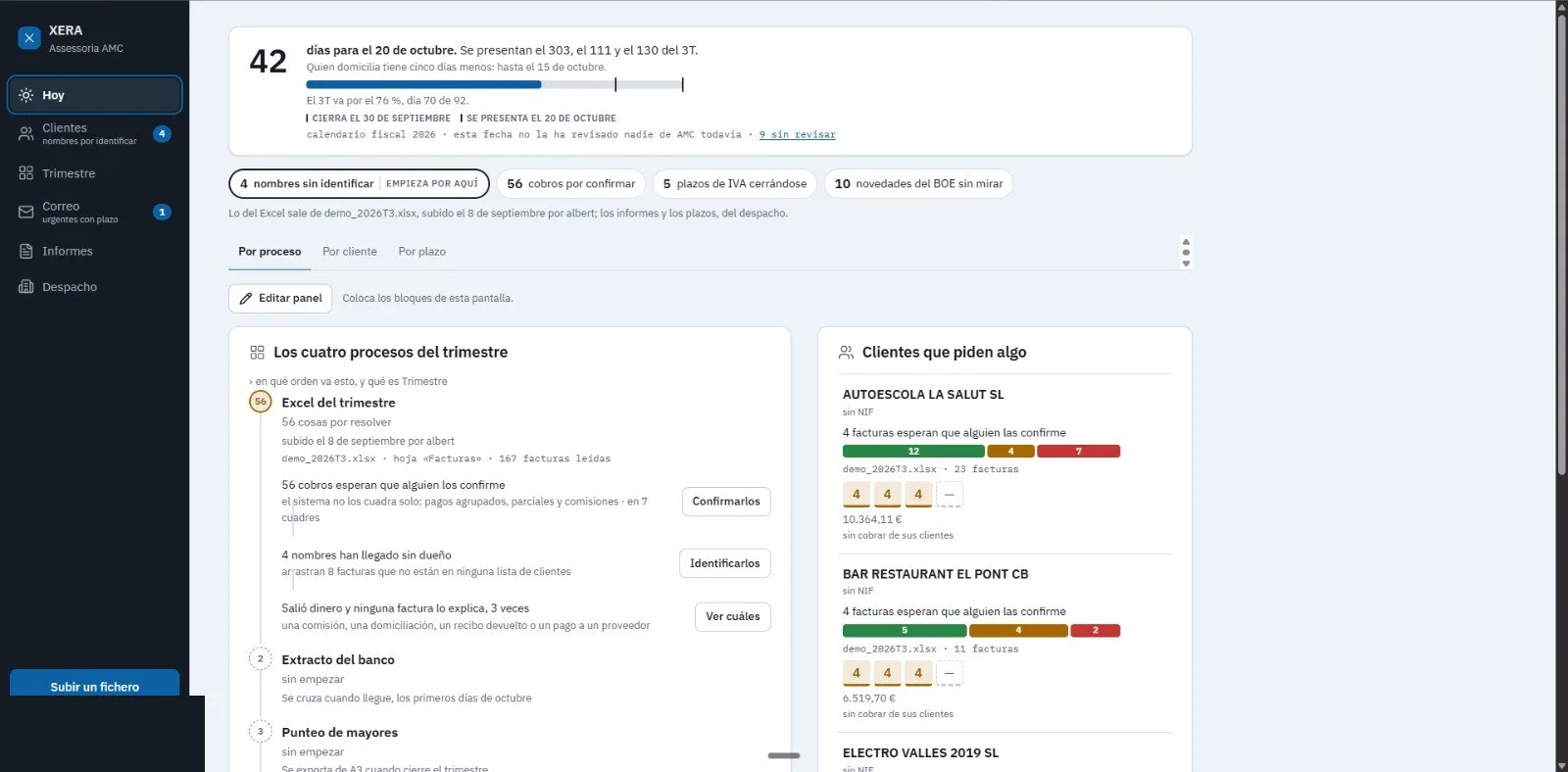
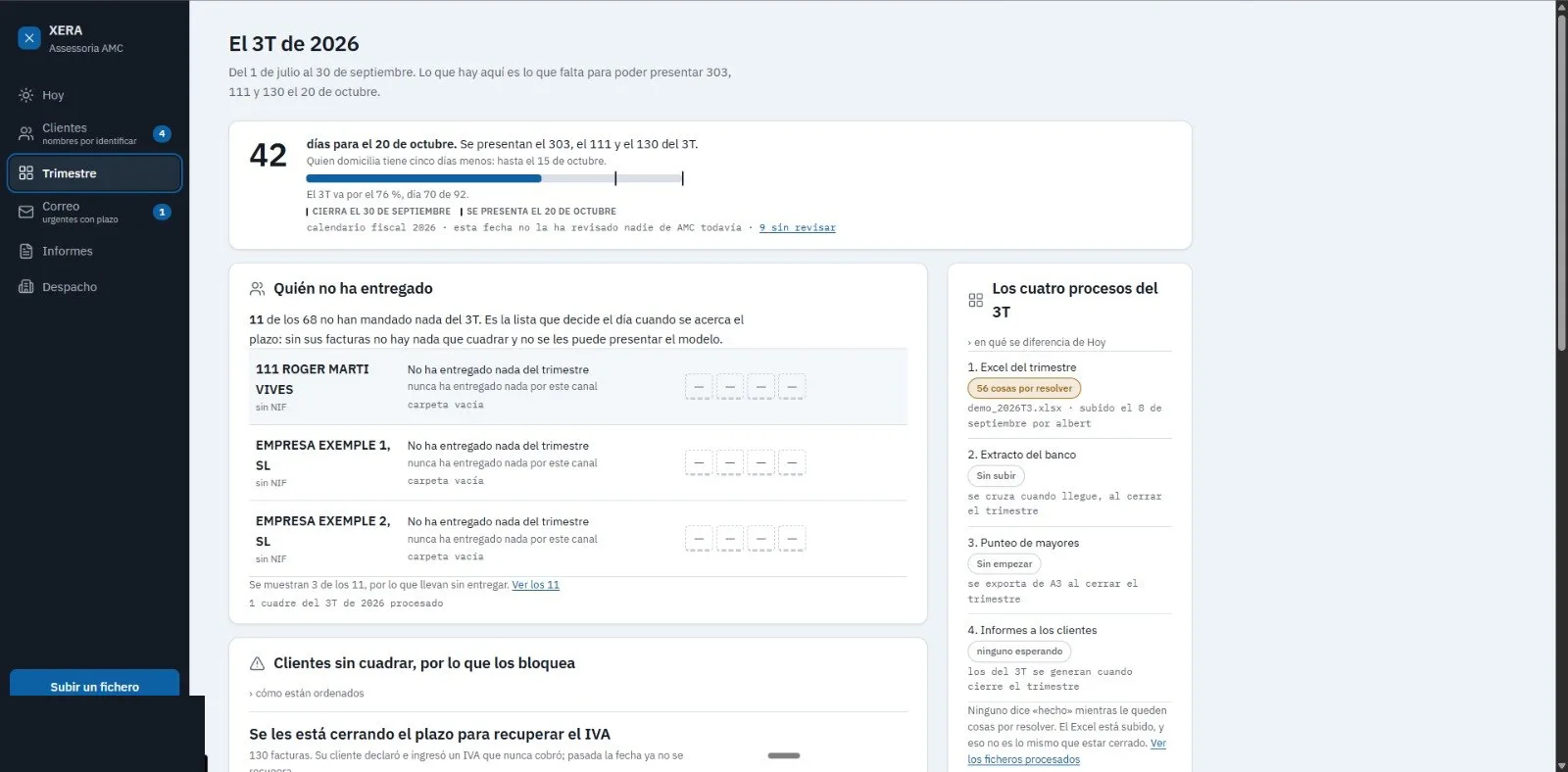
It knows which documents are missing for the quarter, client by client, and your team sees it on the panel.
Asks for what is missing
It contacts the client by email or WhatsApp and sends a second reminder if they do not reply.
Files and links
The document is filed under the right client; if your accounting software has an API, we connect it.
If needed, it escalates to the staff member in charge with the summary of the file. The last word is yours: whatever leaves the firm is approved by a person.
If you run an accounting firm, you already know where the time goes
Spain's Crea y Crece Law has multiplied the volume of documents coming into the firm without anyone having been hired to cope with it. Mandatory e-invoicing is arriving, and the operational bottleneck you already had becomes more visible every quarter.
The Spanish Tax Agency (AEAT) deadlines do not wait. A wrong figure in a form 303 for lack of time does not only cost a penalty: it costs the client's trust. And winning that trust back takes longer than doing things right from the start.
XERA removes the data-entry work. Your team gets on with advising.
What XERA does in your firm every day
Classifies invoices and documents instantly
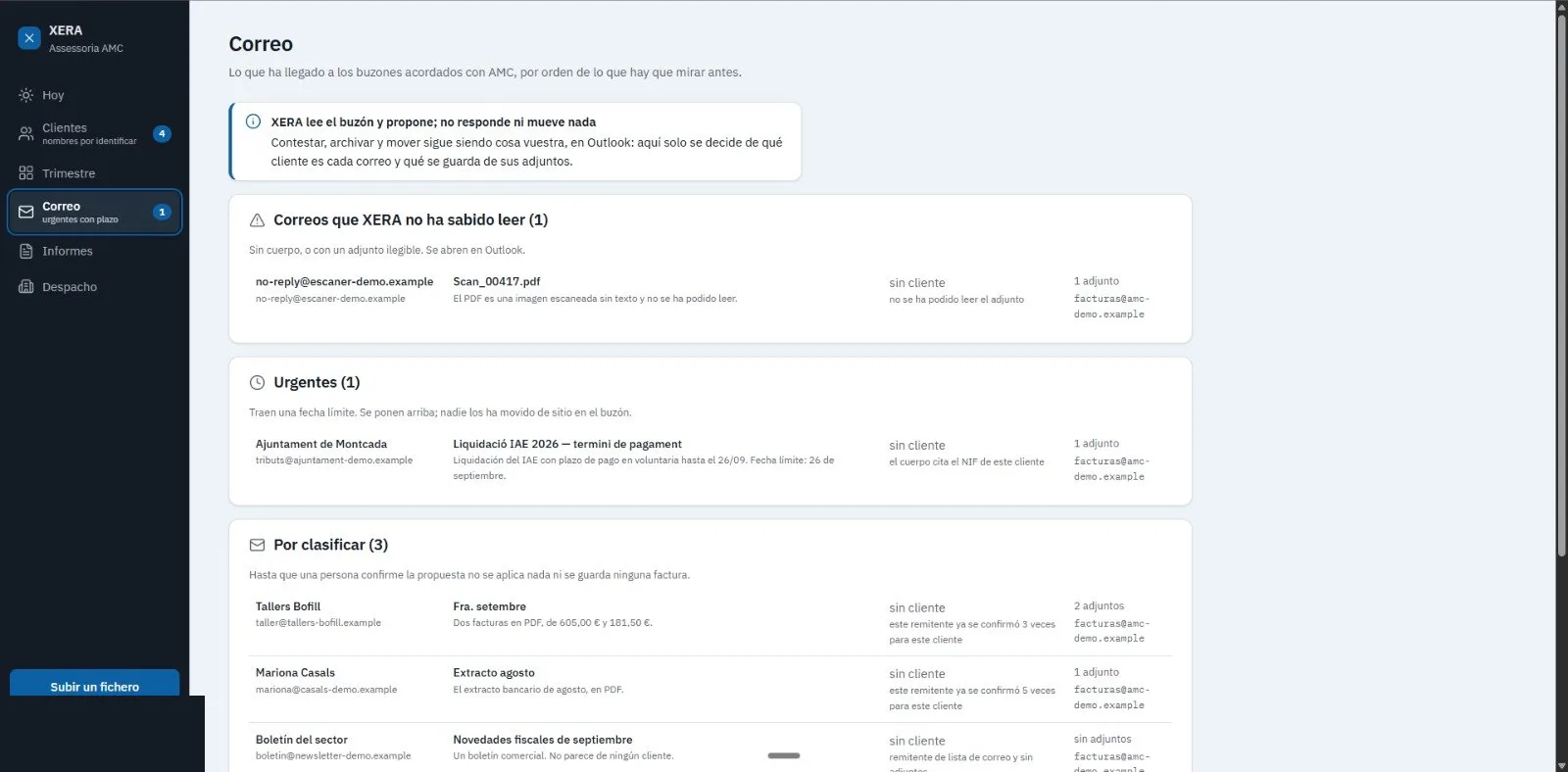
XERA reads every document that comes in —invoice, delivery note, bank statement, lease agreement—, identifies it, extracts the amount, supplier and VAT, and leaves it filed under the right client.
Chases the documents that are missing
When a client does not send what you need, XERA contacts them by email or WhatsApp, sends a second reminder if they do not reply, and escalates to the staff member in charge only if needed. Nobody in your firm picks up the phone or writes a chasing email.
Prepares drafts of quarterly tax filings
Forms (modelos) 303, 111, 115, 130, 390. XERA groups the quarter's data and generates the draft with the numbers from the client file. You come in, review and validate.
Answers clients about their paperwork 24 hours a day
Your client asks at eleven at night whether their form was filed. XERA looks at the real client file and replies with the right status, without bothering anyone on the team. The client gets an answer from the file, not a generic reply.
Warns about deadlines without being asked
Every client receives personalised tax reminders with just the right notice. The client is warned in time and does not call on the last day of the quarter with the papers in a mess.
Firm dashboard and reports
Workload per staff member, clients with documents pending, upcoming deadlines, expected revenue. A monthly PDF for the partners, generated every month. All visible from the panel.
Without migrating from your accounting software
Your accounting software has been running for years. Your team knows it. Your data is there. XERA does not ask you to migrate or to learn a new tool to keep the books. It sits on top of the system you already have and covers the operations that system does not do: serving the client, chasing documentation, automating invoices, flagging tax deadlines.
The automation runs underneath, transparently. Where there is an API, XERA connects your client portal, the firm's email, WhatsApp Business and your accounting software into a single flow. Your team works on the same screens as always. The difference is what they no longer have to do by hand.
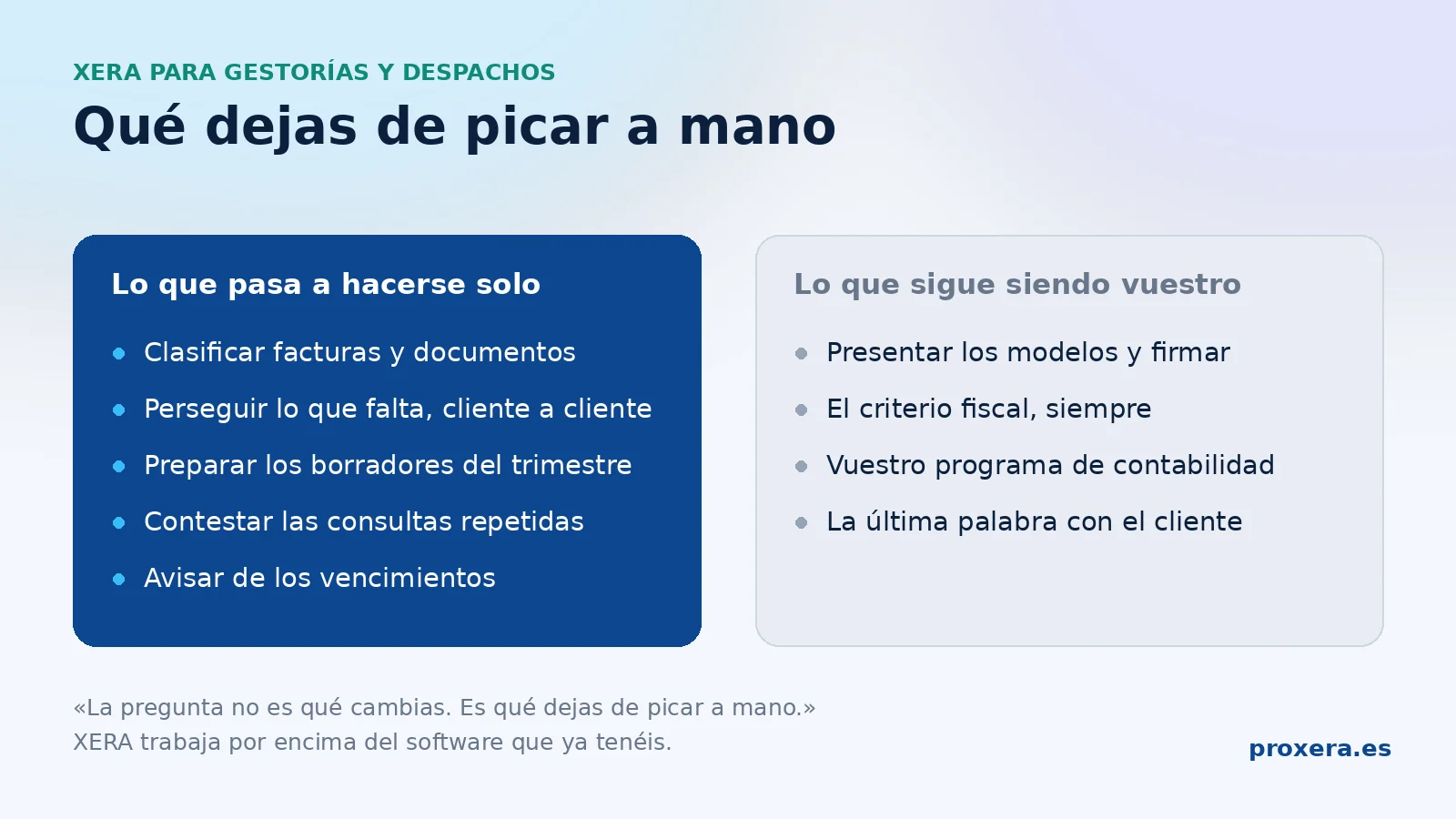
The question is not "what do you change". It is "what do you stop keying in by hand".
What exactly is AI automation software for an accounting firm
It is not new accounting software, and it does not replace the one you already use. It is a layer that sits on top and takes care of the work a person does by hand today: reading what comes in, classifying it, asking for what is missing and warning before a deadline expires.
What it does, specifically:
- Reads and classifies the invoices and documents that arrive by email, WhatsApp or portal, and files them under the right client.
- Chases the documentation that is missing to close a quarter, client by client, without anyone having to keep the list.
- Answers the repeated queries —"have you filed my 303?", "what am I missing?"— with the data from the client file, not with a generic reply.
- Warns about deadlines before they pass, and says who has not handed in.
What it does not do, and it is worth saying:
- It does not file forms for you or sign anything on your behalf.
- It does not decide tax judgement: it prepares the work for a professional to review.
- It does not force you to migrate accounting software.
- The last word with the client is yours: XERA proposes and prepares, and whatever leaves the firm is approved by a person.
The difference from automating "by rules" is that here you do not have to write a rule for every case. A document that arrives in another format, an email written in a different way or an invoice from a new supplier are all handled the same way, because what it understands is the content, not the format.
Three situations you already know
The firm that chases invoices all month
A firm with a book of self-employed clients has an unwanted ritual: every month, staff spend a whole day on the phone and email chasing the client who has not sent the month's invoices. With XERA, each client receives an automatic reminder; if they do not reply, a second reminder follows; if they still have not sent the documents, the system escalates to the staff member in charge with a summary of the file and the communication history.
The advisor who gets repetitive questions by email every day
There is a type of partner whose clients call in August to ask whether the form was filed. Every morning they arrive at the office with emails that all say the same thing: "how much do I owe this quarter?", "was the 303 filed?", "what documents do I need for the income tax return?". With XERA, those queries answer themselves: the agent looks at the real status of the client file, gives the client the correct answer and logs the interaction. The partner gets the morning back to do what they do best: genuinely advising the clients who need judgement, not those who need information that is already in the system.
The firm that wants to grow without drowning in fixed costs
A firm that wants to grow stalls when expanding the team pushes up the cost structure before the new income arrives. With XERA absorbing the repetitive load of current clients —document classification, deadline reminders, handling basic queries, drafts of quarterly filings— the team recovers real operating margin to serve more clients without increasing headcount.
XERA works on top of the software you already have
If you have been using your accounting software for years and do not plan to change it, perfect. XERA covers the space those systems do not: client relationship operations, daily document management, out-of-hours service and the automation of the repetitive administrative work that eats your team's time. It is not a replacement. It is the layer that is missing between your accounting software and your clients.
And integrations? It depends on the ERP and we tell you before you sign, not after. If your software has an open API, we assess it with you in the demo (held in Spanish): we look at your case and tell you whether it is feasible. If your software does not allow it, we tell you and that is that: we would rather lose a sale than sell you something we cannot deliver.
Where your software has an API, the technical integrations —reading data from the accounting software, connectors with the client portal— are configured by the Proxera team during onboarding. Your firm does not need to dedicate technical resources or learn anything new.
Where your data is kept
Your clients trust you with their tax data. We treat it the way you would. Our server is in Finland (Hetzner). It is not cross-referenced with the data of other clients on the platform. Providers and international transfers are detailed in our privacy policy (Spanish only).
Frequently asked questions
See it working
One minute with XERA on the inside: how the work comes in, how it classifies it and what your team sees on the panel.
Let's look at it with your numbers
Free diagnostic
We send you a page with 3 tasks in your firm that can be automated, with AI or without it, and with what we would do it. No savings figures and no commitment. If it suits you, we then book a call. Calls, demos and the free diagnostic are held in Spanish.
Free diagnostic (in Spanish)Fill in the form and we send you the diagnostic.
Server in Finland · GDPR
Shall we see what XERA would do in your business?
Tell us which process you want to automate and we'll show you how XERA would fit into your real operations.
No sign-up · no spam. Calls, demos and the free diagnostic are held in Spanish.