Centralise several WhatsApp Business numbers of your company in one customer service system (Spain guide 2026)
Your company has the reception number, the technical support number and the sales number, each on a different phone. María looks after reception. Jordi looks after support. If Jordi is away, the client is left without an answer and nobody else knows what Jordi told them last week.
This is not a WhatsApp problem. It is a customer service infrastructure problem. And it has a solution with the WhatsApp Business API.
Quick answer
| Question | Answer |
|---|---|
| Can a company have several WhatsApp Business API numbers? | Yes, within the same verified Meta Business Manager. |
| What is the maximum number? | BSPs usually work with up to 20 per Business Manager. Meta does not publish that limit in its official documentation; the exact cap is confirmed by the BSP during onboarding. |
| Can the team see all the numbers from a single panel? | Yes, if the BSP supports multi-agent and multi-number. Not all of them include it in the base plan. |
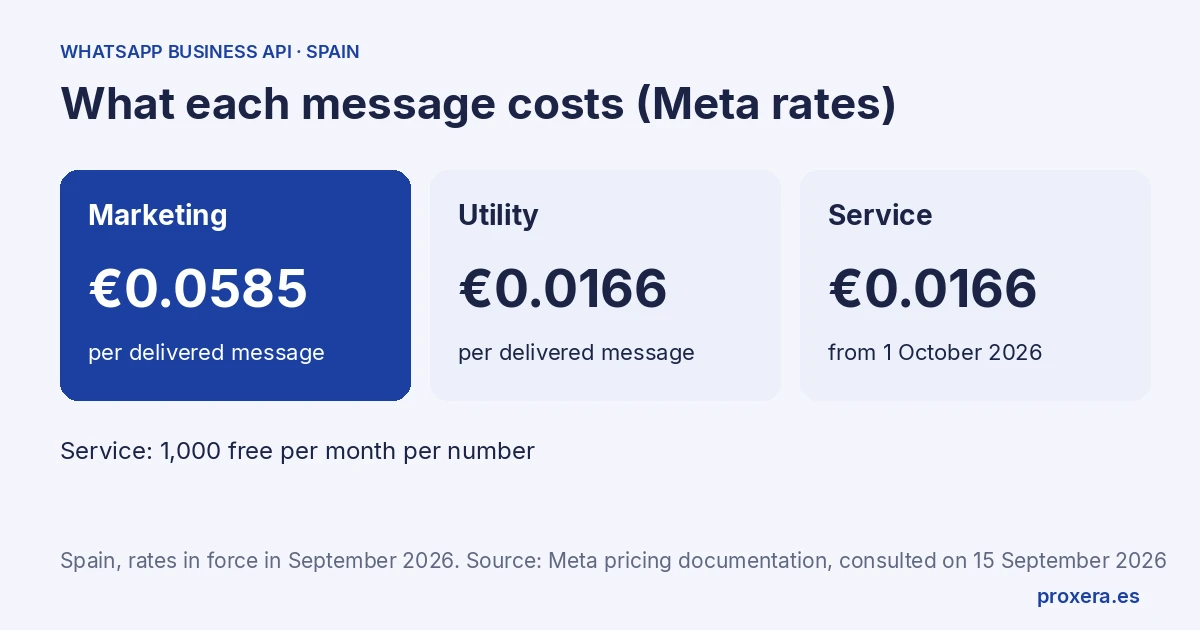
| How much does each message sent cost? | The WhatsApp Business API charges per delivered message. In Spain: €0.0585 per marketing message, €0.0166 per utility message (operational notices). Source: developers.facebook.com/documentation/business-messaging/whatsapp/pricing, consulted on 15 September 2026. |
| Do I need to sign a data processing agreement with the BSP? | Yes. The GDPR (art. 28) requires a written contract with any provider that processes your clients' data. It is called a DPA. |
1. What a verified Business Manager is and why it is the starting point
To use the WhatsApp Business API you need a Meta Business Manager (also called Business Portfolio): the company account where Meta registers your organisation and from which it manages access to numbers and templates.
A Business Manager can have several active phone numbers. Each number has its own profile (name, photo, opening hours) and its own approved message templates. What they share is the umbrella of the verified company account.
Verifying the Business Manager is the step that takes the longest: Meta asks for official documentation (deeds, tax ID, or the equivalent in your country) and the process can take from days to weeks. It is the first step and it is best to start it before choosing a BSP, not after.
2. What a BSP is and why you need one
The WhatsApp Business API is not an app. It is a technical channel that is only accessed through a Business Solution Provider (BSP): a company authorised by Meta to give access to the API and provide the tools your team works on.
The BSP is the one that:
- Gives you the phone number (or migrates yours, if you decide to port it)
- Gives you access to the panel where the team sees and answers conversations
- Sends the templates to Meta for approval
- Signs the DPA with which you cover your GDPR obligation
- Invoices Meta's costs plus its own fee
If you have several numbers, they all go through the same BSP and are all managed from the same panel — if the BSP supports it. Not all of them include multi-number management in their basic plans.
3. How multi-agent management works from a unified panel
"Multi-agent" means several members of the team can attend at the same time, with assigned conversations and shared visibility:
- A unified inbox with all the messages, from one or several numbers
- Assignment of conversations: client X's chat is assigned to colleague Y
- Internal notes: comments between the team that the client does not see
- Automatic replies outside office hours, or for the first frequent questions
- Labels to classify (urgent, documentation pending, closed)
Without multi-agent, if María is on leave, the messages on her number stay unread until she returns. With multi-agent, another member of the team can take that inbox without needing access to María's phone.
4. GDPR and the data processing agreement (DPA) when you centralise several numbers
When you centralise several numbers in a BSP, that BSP processes the data of all your clients: names, phone numbers, the content of conversations. It is a data processor within the meaning of the GDPR and you need a signed contract with it before starting.
That contract is called a DPA (Data Processing Agreement). The GDPR (article 28) requires it in writing and it must cover:
- Purpose: what the BSP uses the data for and how long it keeps it
- Sub-processors: BSPs use Meta as a sub-processor; the DPA must list the sub-processors and how international transfers are handled if the servers are outside the EEA
- Security measures: encryption in transit and at rest, access control
- Breach notification: the BSP must undertake to notify you within a period that lets you meet your obligations as data controller
Before signing, ask for the DPA and check where the data is processed. A BSP with servers outside the EU can be valid if the DPA includes the European Commission's standard contractual clauses (SCCs), but you need to know in advance.
5. The difference between connecting your own numbers and managing your clients'
This distinction causes the most confusion, and it matters before committing to a client or a proposal.
If this is your case: Xera Chat, customer service →
Connecting your own numbers (your company's) to a BSP is the standard case: you register your numbers in your company's Business Manager, choose a BSP and start operating. There are no special requirements beyond verifying the Business Manager.
Managing a client's numbers (your company is an integrator or consultancy and the numbers belong to another company) requires an extra step that many people do not know about. As we understand Meta's requirements (check them in Meta's documentation, as they change), to be able to connect and administer a third party's WhatsApp Business on their behalf, you need the role of Tech Provider or Solution Partner of Meta, which involves passing a review of your application (App Review) and obtaining Advanced Access on the whatsapp_business_management and whatsapp_business_messaging permissions.
Without that access, the client who owns the numbers can connect them to a BSP directly themselves, but cannot delegate that management to you.
The question to ask any provider who offers you this service: does it have verified advanced access from Meta as a Tech Provider or Solution Partner?
6. Steps to centralise several numbers of your company
- Start the verification of the Business Manager — before anything else. You need a tax ID, deeds or an official document that proves the company. It can take days.
- Decide which numbers you use — connect the WhatsApp Business you already use (coexistence: you keep using the app and the last six months of history can be brought over) or register a clean number, with no WhatsApp, directly on the API.
- Choose the BSP — check that it supports multi-number and multi-agent management, that it invoices in euros and that it signs a DPA; check where it processes the data (see section 4). Ask for a demo with the numbers you want to connect.
- Configure the profile of each number — name of the team or department, photo, opening hours, welcome message.
- Design the message templates — utility templates (reminders, notices) and marketing templates (commercial communications). Send them to Meta for approval from the BSP.
- Tell the team about the change — train whoever is going to use the panel. The learning curve is short, but on the first day it is worth having support from the BSP.
- Tell clients about the new channel — add the WhatsApp button to the website, the email signature and the cards. Ask for explicit opt-in for commercial communications.
7. How much it costs
The cost has two layers:
Layer 1: Meta's fee per delivered message. Rates in Spain in force in September 2026, source: developers.facebook.com/documentation/business-messaging/whatsapp/pricing, consulted on 15 September 2026:
| Category | € per delivered message |
|---|---|
| Marketing | €0.0585 |
| Utility | €0.0166 |
| Service (reply to client messages) | €0.0166 from 1 October 2026 (1,000 free per month per number) |
Layer 2: the BSP's fee — a fixed monthly fee plus, in some cases, a markup on Meta's messages. It varies a lot between providers.
Meta's cost applies to the messages sent from the platform; what is written from the app is free and what is received costs nothing. (Source: Meta's official documentation on coexistence)
Frequently asked questions
Can I have the same number on several devices at once with the WhatsApp Business API?
That is not how the API works. The WhatsApp Business API is not an app: it is a channel on which tools are built. What gives you "several devices" is the BSP's panel, where different members of the team access it from their own computer or phone — not the WhatsApp app.
If I migrate a number, do I lose the old messages?
Not with coexistence: the last six months of history can be brought over and groups stay in the app. If you remove the number from the app to register it only on the API, the history stays on the devices where it was.
How long until everything is working?
The step that takes longest is the verification of the Business Manager (days to weeks). Once verified, the rest depends on the BSP and on Meta's approval of your templates.
Can I connect WhatsApp with the software I already use (A3, Sage, Holded, a CRM)?
The WhatsApp Business API is a standard channel that connects to other systems through the BSP or directly with Meta's API. Whether it works with your specific software depends on whether there is a native integration or you need a custom connector. Ask the BSP before signing up.
If what you need is an assistant that answers your clients on WhatsApp, see Xera Chat and its official WhatsApp integration (Meta). We reply in Spanish.
To see how the WhatsApp Business API works in detail and compare providers in Spain, read the full guide: WhatsApp Business API for accounting firms and professional practices.
AI in action
Want to see XERA in action?
Talk directly to XERA and find out how it can automate the repetitive tasks in your business.
No commitment
Prefer it with a fixed day and time?
Book a video call (in Spanish)Pick a slot and the invitation reaches you straight away. The booking page is in Spanish.
Related content
Automate Your Accounting Firm in 2026: A Practical Guide for Professional Practices
A practical guide to automating your accounting and tax advisory firm or professional practice in 2026. What to automate, where to start and how XERA can help without changing your tax software.
2026 Personal Income Tax (IRPF) Checklist for Accounting Firms: Calendar, Documentation and Errors That Cost Penalties
A 2026 IRPF checklist for accounting firms: the tasks before, during and after the campaign. Avoid the chaos of April to June.