How to divert your business calls to an AI receptionist: Movistar, Vodafone, Orange and Digi
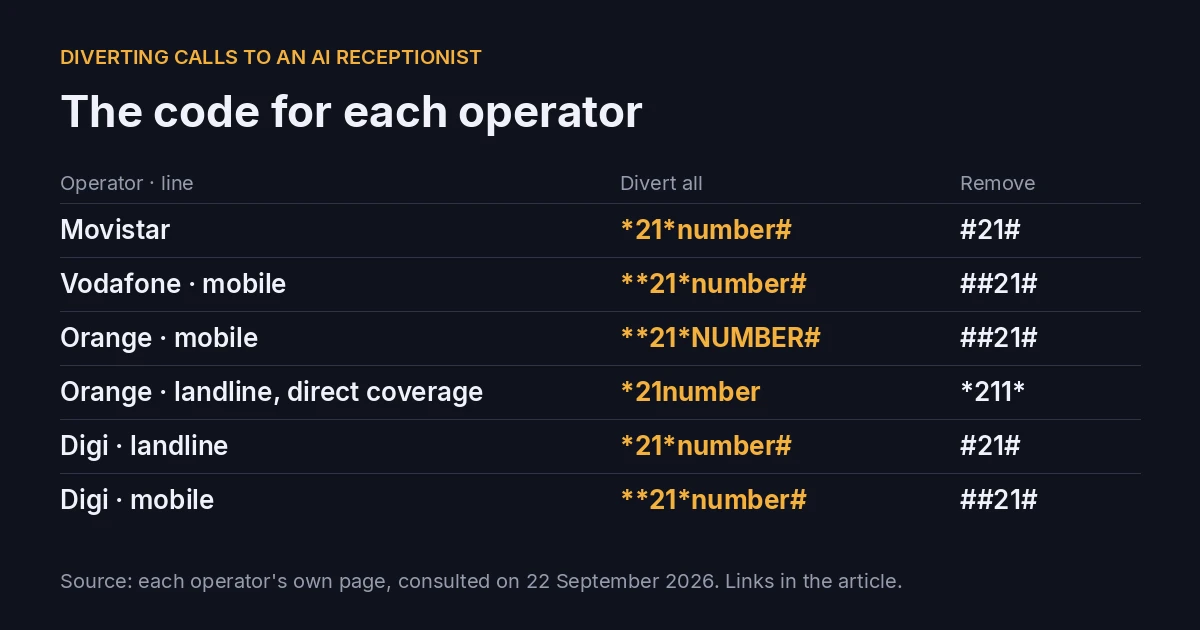
For an AI receptionist to answer your business phone you do not need to change your number. You divert the calls from your usual number to the assistant's number. It is a code that you dial once from your phone.
Here is the code for each operator, copied from its own page and linked. And what we have learned installing it: where it works and where it does not. These are the Spanish operators; the codes apply to lines in Spain.
Quick answer
| Question | Answer |
|---|---|
| Do I have to change my number? | No. You divert your current number to the assistant's. |
| Which code do I dial? | Almost always *21*number# on a landline and **21*number# on a mobile. It changes by operator and line: table below. |
| How do I remove it? | #21# on a landline, ##21# on a mobile, in most cases. Orange landline with direct coverage uses another one. |
| Does it cost anything? | It depends on the operator. Movistar charges €4/month for the service, according to its blog. Orange and Vodafone mobile say that activating it is free. The diverted call is paid for by your line according to your tariff. |
| Does it always work? | No. With local numbers diverted to a provincial number, yes. With unusual numbering, such as numbers starting with 5, it has failed. |
| What if I have a switchboard? | The diversion is configured by your switchboard provider, it is not dialled with a code. |
First: which diversion suits you
All the operators in this article have at least these two:
- Divert all calls (code with 21). The phone does not ring in your business: the assistant always picks up.
- Divert if you do not answer (code with 61). It rings first in your business. If nobody picks up, it passes to the assistant. According to Movistar's blog, in its case the call is diverted if you take 15 seconds to answer.
Some also have if busy (67) and, on mobile, if switched off or out of coverage (62).
If you want the assistant to be your back-up and not your first voice, start with "if you do not answer".
The codes, operator by operator
Where it says number, dial the number you want to divert to: the assistant's.
Movistar
Source: Movistar's official blog, "Desviar llamadas, entre números fijos y móviles" (in Spanish). According to Movistar, the service «sirve para números fijos y móviles» and is limited to calls within the country.
| Diversion | Activate | Deactivate |
|---|---|---|
| Always | *21*number# |
#21# |
| If you do not answer | *61*number# |
#61# |
| If busy | *67*number# |
#67# |
Pick up the handset, dial the code, wait for the confirmation tone and hang up.
Cost: Movistar states that the diversion «tiene un coste de 4 € al mes» (costs €4 a month). Diverted calls count towards your flat rate or minute allowance, if you have one.
Vodafone (mobile)
Source: Vodafone, "Desvío de llamadas Vodafone" (in Spanish).
| Diversion | Activate | Deactivate |
|---|---|---|
| All calls | **21*number# |
##21# |
| If you do not answer | **61*number# |
##61# |
| If busy | **67*number# |
##67# |
| Switched off or out of coverage | **62*number# |
##62# |
| Remove all diversions | — | ##002# |
Cost: «Activar el desvío de llamadas en los móviles de Vodafone es gratuito» (activating call diversion on Vodafone mobiles is free). It can also be done from the Mi Vodafone app.
We do not cover Vodafone landlines here.
Orange (mobile)
Source: Ayuda Orange, "Desvía las llamadas que recibes en tu móvil a otro número" (in Spanish).
| Diversion | Activate | Deactivate |
|---|---|---|
| Unconditional | **21*NUMBER# |
##21# |
| No answer | **61*NUMBER**TIME# |
##61# |
| Busy | **67*NUMBER# |
##67# |
| Switched off or out of coverage | **62*NUMBER# |
##62# |
| Remove all diversions | — | ##002# |
Cost: according to Orange, «la activación no tiene coste» (activation has no cost). You pay for the diverted call, from your mobile to the destination number.
Orange (landline)
Source: Ayuda Orange, "Desvía las llamadas de tu teléfono fijo de Orange a otro fijo o a un móvil" (in Spanish).
There is a catch here: the code changes depending on whether your line has direct or indirect Orange coverage. If you do not know which you have, try one and listen for the confirmation tone.
| Diversion | Direct coverage | Remove | Indirect coverage | Remove |
|---|---|---|---|---|
| All | *21 + number (nothing at the end) |
*211* |
*21*number# |
#21# |
| If busy | *22 + number |
*221* |
*67*number# |
#67# |
| If no answer | *23 + number |
*231* |
*61*number# |
#61# |
Pick up the handset before dialling.
If this is your case: Xera's voice assistant →
Orange for businesses (Conecta Pymes). According to Orange's help for Conecta Pymes (in Spanish), the codes are those of direct coverage (*21, *22, *23), but only in the Conecta Pymes 2A plan. «Para el resto de modalidades, solo se podrán aplicar desvíos, llamando al 1471» (for the other plans, diversions can only be applied by calling 1471).
Digi
Source: Digi, "¿Puedo realizar un desvío de llamadas a otro número?" (in Spanish).
| Diversion | Landline · activate | Landline · remove | Mobile · activate | Mobile · remove |
|---|---|---|---|---|
| All | *21*number# |
#21# |
**21*number# |
##21# |
| If you do not answer | *61*number# |
#61# |
**61*number# |
##61# |
| If busy | — | — | **67*number# |
##67# |
| Switched off or out of coverage | — | — | **62*number# |
##62# |
| Remove all | — | #002# |
— | ##002# |
Digi only lets you divert to national landlines or mobiles. And on mobile the diversion is incompatible with the missed-call notice and with unconditional diversion to voicemail.
Watch out: Digi publishes these codes, but in our experience not all Digi lines allow the diversion. If you dial the code and do not hear a confirmation, call Digi before taking anything for granted.
What we have seen installing it
The codes are the easy part. What fails depends on the type of number.
- It works: local landline numbers diverted to a provincial number. We set it up like that in a real installation and the calls come in without a problem.
- It fails: unusual numbering. It has happened to us with numbers starting with 5. If your number is neither a normal geographic landline nor a mobile, test it before counting on the diversion.
- Some companies do not allow it on all their lines, such as Digi (above).
- Switchboard: if your business has a switchboard, the diversion is not dialled with a code. Your switchboard provider configures it.
That is why, when we install our assistant, the first test is always the diverted call, before touching anything else.
How to check that it works
- Activate the diversion with your operator's code.
- Wait for the confirmation tone and hang up.
- Call your number from another phone, not from the same line.
- If the assistant answers, it is done. If your phone rings or gives an error, check the code for your line (on an Orange landline, try the other coverage's) or call your operator.
- To go back, dial the deactivation code.
What happens on the other side of the diversion
In our case, the diverted calls arrive at a Barcelona (93) number of its own that we give you. Our voice assistant answers there: it answers in Spanish only, takes a message and, when the call ends, you receive an email with the call summary. (In addition, your voice panel has each call's audio and transcript.)
What it does not do, so that you know beforehand: it does not confirm appointments with a day and time (it takes the time slot they give and a person confirms it), and it does not put the call through live to a person.
It costs €58/month with 250 minutes included (Solo voz) or €99/month with 500 minutes (Voz Pro), VAT extra, with a 3-month minimum commitment. The full detail is on the voice assistant page.
Try it before diverting anything
Call our demonstration number and talk to the assistant as one of your clients would. It answers in Spanish: +34 930 34 78 22.
That way you know how it sounds before dialling any code.
Sources
Pages consulted on 22 September 2026. If your operator changes the codes, check its page.
- Movistar: Desviar llamadas, entre números fijos y móviles
- Vodafone: Desvío de llamadas Vodafone
- Orange mobile: Desvía las llamadas que recibes en tu móvil a otro número
- Orange landline: Desvía las llamadas de tu teléfono fijo de Orange a otro fijo o a un móvil
- Orange Conecta Pymes: Desvío de llamadas en Conecta Pymes
- Digi: ¿Puedo realizar un desvío de llamadas a otro número?
AI in action
Want to see XERA in action?
Talk directly to XERA and find out how it can automate the repetitive tasks in your business.
No commitment
Prefer it with a fixed day and time?
Book a video call (in Spanish)Pick a slot and the invitation reaches you straight away. The booking page is in Spanish.
Related content
Automate Your Accounting Firm in 2026: A Practical Guide for Professional Practices
A practical guide to automating your accounting and tax advisory firm or professional practice in 2026. What to automate, where to start and how XERA can help without changing your tax software.
2026 Personal Income Tax (IRPF) Checklist for Accounting Firms: Calendar, Documentation and Errors That Cost Penalties
A 2026 IRPF checklist for accounting firms: the tasks before, during and after the campaign. Avoid the chaos of April to June.