AI invoice automation in accounting firms: VeriFactu and your billing software
VeriFactu has put pressure on many accounting firms, but the real problem is not only the regulation: it is the operational load that the invoice process carries when it still depends on loose emails, disorganised PDFs, manual validations and repetitive reviews.
The good news is that this change also opens an opportunity. If your firm already works with billing software, you can use AI to organise document intake, reduce errors and have the team spend more time reviewing exceptions and less moving files from one place to another.
What VeriFactu really changes for an accounting firm
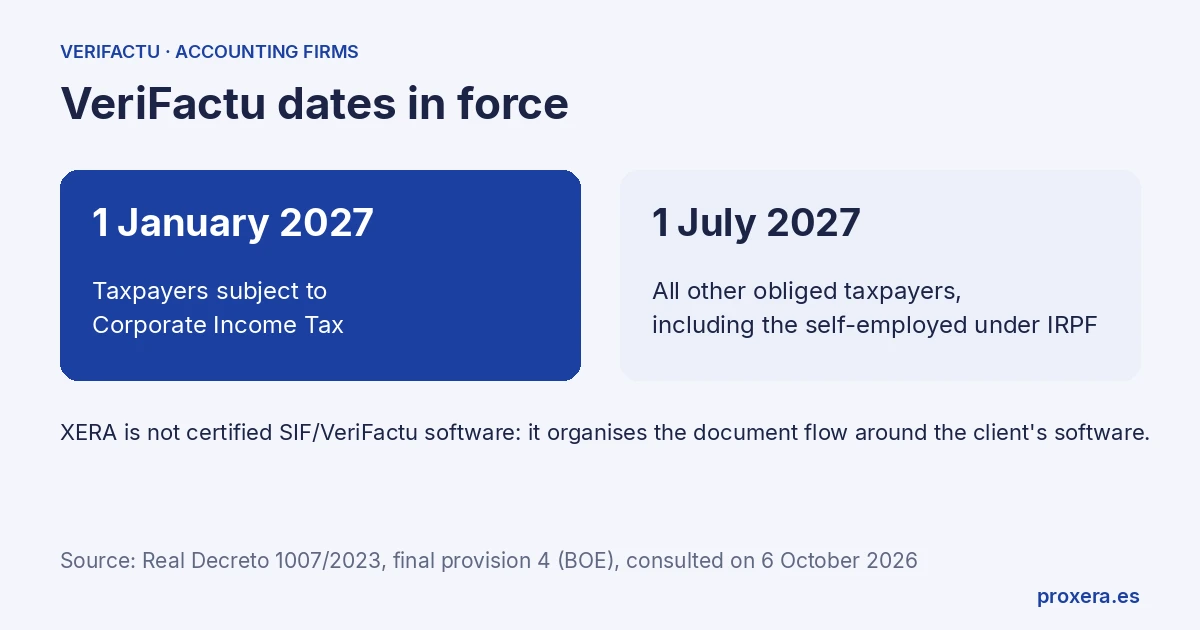
The VeriFactu calendar has been adjusted several times. The dates now in force are:
- 1 January 2027: taxpayers subject to Corporate Income Tax
- 1 July 2027: all other obliged taxpayers, including the self-employed under IRPF
They come from the fourth final provision of Real Decreto 1007/2023, as amended by Real Decreto 254/2025 and Real Decreto-ley 15/2025 (BOE, consulted on 6 October 2026). That is worth reading calmly: not as an invitation to wait, but as a reason to prepare with margin, without rushing.
There is a key idea here: the client's software is not the main problem. The firm's work is in how the data is organised, validated and moved around that software.
Where the client's billing software fits
The client's billing software or ERP remains the central piece of invoicing. XERA does not aim to replace it or to become the client's certified system.
XERA's role is a different one: acting as an operational AI layer around the flow. That means helping with tasks such as:
- capturing invoices and receipts from email, forms or folders
- extracting relevant data automatically
- detecting absences or inconsistencies before moving on to the next step
- classifying by client, period, type of expense or priority
- preparing the file for human review
- leaving a trace for the team
Put simply: the billing software handles the invoicing core; XERA helps ensure that intake, review and document order do not depend on unnecessary manual work.
What an accounting firm can automate with AI
A well-designed automation does not try to "do everything on its own". Its aim is to remove friction where the most time is lost.
1. Capturing invoices and receipts
The first bottleneck is usually the intake.
One client sends a PDF by email, another sends a photo, another uploads the file to a shared folder and another leaves the document half-done. AI can centralise that intake and turn it into a single flow with labels and context.
2. Reading and extracting fields
Once the document comes in, the system can read and prepare fields such as:
- issuer
- date
- amount
- taxable base
- VAT
- description
- tax ID (NIF/CIF) where applicable
- associated client
If something does not add up, there is no need to force the process. It is left for review.
3. Prior validation
This is where much of the operational benefit lies.
Before the team reviews everything manually, AI can flag:
- illegible invoices
- incomplete documents
- missing fields
- suspicious amounts
- duplicate files
- data that does not fit the client's file
That does not replace professional judgement. It makes it more efficient.
4. Classification and routing
Not all invoices need the same treatment. Some go through clean; others require intervention.
AI can classify by:
- client
- quarter or period
- type of expense
- urgency
- review status
- origin of the document
With that, the firm stops treating each document as an isolated piece and starts working with a clear circuit.
5. Archiving and traceability
The invisible part pays off later.
Each invoice can be archived with its context, its status and its review history. That simplifies internal audits, future searches and control of the team's work.
A practical flow for an accounting firm
A simple example helps more than an abstract list.
Step 1. Unified intake
The client sends the invoice by email or form, or leaves it in a defined folder. The system detects it and picks it up.
Step 2. Automatic preparation
The AI extracts the main content and creates a work record with the most relevant data.
Step 3. Review by exception
Only what really needs it goes to human review: doubtful, incomplete or out-of-pattern documents.
Step 4. Registration in the client's system
The information is prepared for use in the software the client uses (if it has an API, we connect it).
Step 5. Archiving and follow-up
A trace of everything remains: what came in, when, who reviewed it and in what state it ended up.
That approach avoids two very common mistakes: believing that automation must replace the team and thinking that complying is the same as carrying on working the same way but faster.
What must not be promised
Here it is worth being very clear.
XERA is not certified SIF/VeriFactu software.
XERA does not replace the client's billing software.
XERA does not promise compliance on its own.
What it does do is help the firm manage the document flow around the client's software better, with an AI layer that reduces friction and improves operational order.
That positioning matters because it avoids unnecessary confusion: the value is not in pretending that the tool is the certified system, but in solving the real work that surrounds the process.
What the firm gains with this approach
Without hype or invented figures, the advantages are usually these:
- less time spent on repetitive tasks
- fewer entry or classification errors
- less dependence on email and the chaotic folder
- more capacity to review truly delicate cases
- better document order
- better coordination between team and client
- a cleaner implementation when volume grows
In other words: AI does not replace tax judgement. It supports it.
Checklist to implement it without friction
Before moving anything, it is worth reviewing these points:
- do invoices come in through one clear channel or through too many at once?
- have you defined the minimum classification per client and document type?
- do you know which fields must always be validated?
- is there an inbox or queue of incidents?
- does the final archive allow any document to be retrieved quickly?
- does the team know what the AI automates and what a person still reviews?
- does the client's billing software remain the reference system?
If the answer to several of these questions is no, the project does not need more complexity: it needs order.
Preparing with margin is better than rushing at the end
One of the lessons of VeriFactu is that regulatory changes generate noise, but the real operational problem is usually another: firms leave for the end the part that processes can improve most.
If the document-intake work is already structured, reaching the deadline will not be a race against the clock. It will be a reasonable transition.
And if the firm's clients already use billing software, the opportunity is clear: there is no need to reinvent it; what is needed is to organise the flow around it.
Conclusion
VeriFactu should not push an accounting firm towards more manual tasks. Well focused, it can be a good moment to review how documentation comes in, how it is validated and how it is archived.
XERA fits precisely there: as an operational AI layer around the client's software, to automate the heavy part without confusing it with the regulated system or promising what it should not promise.
If you want to design that flow around your real process, write to us. No generic templates. Calls and demos are held in Spanish.
AI in action
Want to see XERA in action?
Talk directly to XERA and find out how it can automate the repetitive tasks in your business.
No commitment
Prefer it with a fixed day and time?
Book a video call (in Spanish)Pick a slot and the invitation reaches you straight away. The booking page is in Spanish.
Related content
Automate Your Accounting Firm in 2026: A Practical Guide for Professional Practices
A practical guide to automating your accounting and tax advisory firm or professional practice in 2026. What to automate, where to start and how XERA can help without changing your tax software.
2026 Personal Income Tax (IRPF) Checklist for Accounting Firms: Calendar, Documentation and Errors That Cost Penalties
A 2026 IRPF checklist for accounting firms: the tasks before, during and after the campaign. Avoid the chaos of April to June.