Operational AI Agents in 2026: A Real Guide for SMEs That Want to Free Up Operational Capacity
Many SMEs do not have a talent problem. They have a problem of operational capacity.
The team knows how to do its job, but the day goes on repetitive tasks: answering similar queries, chasing documents, remembering deadlines, updating statuses and coordinating through loose messages. By the end of the week, much of the team's time has gone on work that gives no competitive advantage.
This is where the concept of the operational AI agent comes in: not an AI "to try out", but an operational layer connected to your real processes.
What is (and what is not) an operational AI agent?
An operational AI agent is a system that:
- Understands instructions and business context
- Prepares specific tasks on real tools
- Keeps track of the state of each process
- Escalates to a person only when human judgement is needed
It is not a pretty demo with no impact. It is not "yet another app" for your team.
It is a piece of daily operation.
Signs that your company needs it now
If you recognise 3 or more of these signs, it is worth looking at:
- Replies to clients and prospects are late and opportunities are lost
- There are administrative tasks repeated every day
- Sales follow-up depends on human memory
- Conversations are duplicated across WhatsApp, email and calls
- Nobody has a clear picture of the funnel in real time
- Work peaks overwhelm the team every month
Tasks worth automating first
In service SMEs (accounting firms, law firms, agencies, real estate agencies), these are tasks that usually repeat every week:
1) Initial handling
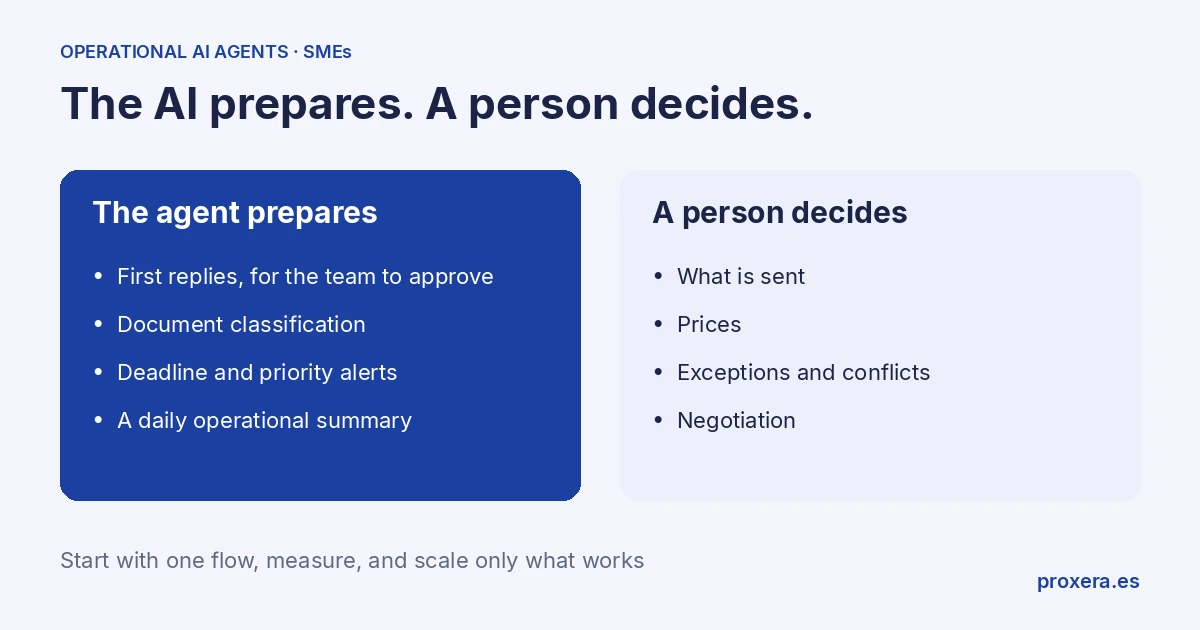
The agent prepares the first replies for the team to approve, filters intent and collects key data.
2) Follow-up
The agent flags which leads or clients are left without a next step, so that follow-up does not depend on someone "remembering". A person approves what is sent.
3) Document classification
Document intake, labelling and routing by type of procedure.
4) Deadline and priority alerts
The agent detects critical dates and pushes tasks to the team in advance.
5) Daily operational summary
An automatic report on what happened, what is blocked and what requires a human decision.
Which metrics to measure from day 1
Without metrics, there is only perception. With metrics, there is direction.
Mandatory minimum:
- Average time to first response
- Weekly hours on repetitive tasks
- Lead-to-meeting conversion
- Meeting-to-proposal conversion
- Rate of overdue tasks
- Team satisfaction with the new way of working (a short internal survey)
Implementation plan (without breaking the operation)
Stage 1 — Operational audit
Map the repetitive processes. Do not start with "everything". Choose only one flow of high volume and low risk.
Example: a recurring task that today is done by hand every week and follows clear rules.
Stage 2 — Configuration and rules
Define:
- Which replies the agent can prepare
- Which data is mandatory to move forward
- When it must escalate to a human
- What tone and what limits it has
Stage 3 — Controlled pilot
Activate with part of the traffic. Review errors, times and quality of response daily. Adjust prompts, rules and escalation criteria.
Stage 4 — Scaling
Extend to more processes: documentation, reminders, internal coordination and the daily summary.
Key: each extension must come with a KPI and an owner.
Typical mistakes that hold back results
- Wanting to automate 20 processes at once
- Not defining limits for human escalation
- Measuring only "messages sent" and not conversion
- Not training the team in the new flow
- Treating AI as an IT project, not a business project
Technology does not replace a broken process. First operational clarity, then automation.
Quick checklist for management
Before activating an operational AI agent, answer yes/no:
- Have we defined the exact flow to automate?
- Is there an owner of the process?
- Do we have a baseline KPI to compare against?
- Is it clear when it escalates to a human?
- Is there a weekly review of results?
If any answer is "no", fix it before deploying.
Operational governance: who decides what
For a system like this to really work, you must define operational governance from the start. A simple rule:
- AI prepares repeatable tasks and clear rules; a person approves what is sent
- The human decides prices, exceptions, conflicts and negotiation
If this boundary does not exist, two problems appear: either the AI is underused (everything goes back to the team), or too much is delegated to it without control. The key is not to automate for the sake of automating; it is to design an operation where each part does what it does best.
Integration with existing tools
You do not need to throw away your current stack. The right approach is to connect the agent to what you already use, if those tools have an API:
- CRM for lead status and pipeline
- Email for follow-up
- Web forms for capture
- Document base for case files
- Metrics panel for management
The most efficient implementation does not replace systems from day 1. It starts by connecting one complete flow from end to end and validating the impact. Then, integrations are extended.
Conclusion
If your team is overwhelmed, you do not need more effort. You need to redesign the operation.
A well-implemented operational AI agent does not replace people: it frees up their time for high-value tasks.
Start with one flow and scale only what works.
Want to see how this approach would look in your company? Contact us; we will go through your current flow with you. Calls and demos are held in Spanish.
AI in action
Want to see XERA in action?
Talk directly to XERA and find out how it can automate the repetitive tasks in your business.
No commitment
Prefer it with a fixed day and time?
Book a video call (in Spanish)Pick a slot and the invitation reaches you straight away. The booking page is in Spanish.
Related content
Automate Your Accounting Firm in 2026: A Practical Guide for Professional Practices
A practical guide to automating your accounting and tax advisory firm or professional practice in 2026. What to automate, where to start and how XERA can help without changing your tax software.
2026 Personal Income Tax (IRPF) Checklist for Accounting Firms: Calendar, Documentation and Errors That Cost Penalties
A 2026 IRPF checklist for accounting firms: the tasks before, during and after the campaign. Avoid the chaos of April to June.